For web agencies

AI-written, sourced articles for your clients’ WordPress sites, approved before they publish

PlainQuill researches, writes and checks a sourced article every day for each client business. You approve it, and it publishes into that client’s WordPress site.

$29, $79 or $149 a month per client site. What the client pays is yours to set.

The review queue in a demo account on a desktop screen: the pieces waiting for a decision listed beside the selected article, "How long a bag of coffee actually stays fresh after roasting", with the statements the editor verified, the automatic checks passed and the sources counted above it, the article as a draft preview with its byline, summary and date, a margin listing its three numbered sources and quoting the three statements the editor verified against them, and Approve, Ask for changes and Something else buttons along the bottom.The review queue on a phone in a demo account, with one article open: a pager reading "2 of 6 need a decision" between List and Next, the article "How long a bag of coffee actually stays fresh after roasting" with the search it was written for, a bar saying 3 of 3 statements verified, 4 automatic checks passed and 3 sources, the start of the draft preview, and one row of Approve, Changes and a menu button above the bottom navigation.
Screens from a demo account for an example coffee roaster. The business and every article shown were written for the demo, and the check results shown are illustrative.

Each week

What a client gets

  • Seven articles a week (fourteen on Max), plus 2, 6, 10 extra articles a month on topics chosen for the client, by plan. Each is researched against live sources, checked by software, and reviewed by a separate editor model.
  • An image with every article, and a post adapted for each social network connected (4, 6 or 12 networks, by plan).
  • Tracked searches with a daily position for each, and, for a business people visit or call, checks of its Google, Yelp and Apple Maps listings against the details confirmed for it.
  • Nothing publishes until someone on the account approves that exact version.

See every plan’s allowances

Several clients

How running many client accounts works

One account per client

Each client business has its own brand brief, sources, plan of topics, queue and approvals, so one client’s rules never reach another client’s writing.

One login

Every account a login owns or has been invited to appears in the business switcher in the dashboard. Switching keeps the page you are on.

Billed per account

Each client’s plan is its own subscription, at the prices on the pricing page. There is no combined invoice for several clients yet.

Approval

Who approves

  • An owner of an account can approve anything in it. To run the content for a client, be an owner of that client’s account.
  • A client who wants to read first can be an owner too, and either of you can approve.
  • A member works only on the drafts under their own byline, and the account owner can require their own sign-off before a member’s work publishes.
  • Settings where the client approves on top of you, or sees only finished work, belong to the agency offering in build and are not on sale.

Nothing publishes without an approval of that exact version, given by you, a teammate you invite, or an assistant you have authorised to approve for you.

WordPress

Publishing into each client’s site

  • Each client site is connected with an application password issued in WordPress for the account the posts should come from. Nothing has to be installed, and the WordPress login password is never asked for.
  • The connection is tested against the site before it is stored, and the application password is encrypted before it is saved. Revoking it in the WordPress profile ends access.
  • An optional helper plugin shortens issuing the password. Connecting does not need it.
  • Delivering the same approved article twice does not create a duplicate post, and a changed article updates the post already there.

The WordPress details

Your client relationship

Whose name is on it

From the same demo account. The dashboard, its sign-in and its billing carry the PlainQuill name.
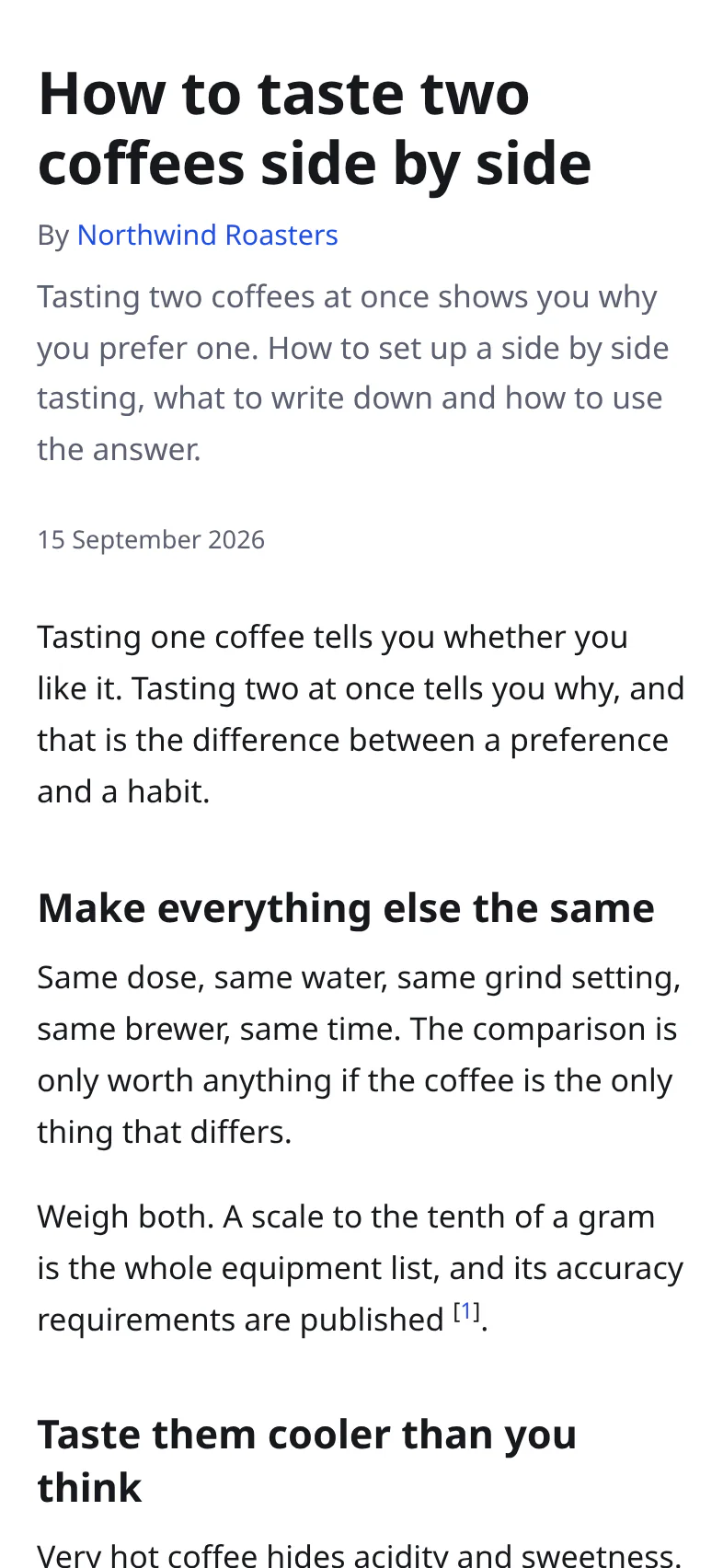
A published demo article on a phone, "How to taste two coffees side by side", with its byline, summary and date, its opening paragraph, its first section headings and a numbered citation marker.
Client’s byline, no PlainQuill credit.

Money

Two ways to set a client up

List prices are $29, $79 and $149 a month per business, or ten months’ price for a year (2 months free). What you charge a client is yours to set.

The client pays PlainQuill

Who holds the account
The client, who invites your login as an owner
What the client pays
The plan’s list price, to PlainQuill
Partner commission
Possible, if they signed up through your partner link: the partner terms decide, including when you also hold an owner seat
If the relationship ends
The client keeps the account, and you are removed from its team

You pay PlainQuill

Who holds the account
You, under an address you keep for that client
What the client pays
Whatever you charge them
Partner commission
No: an account you pay for is your own spend
If the relationship ends
Make the client an owner, then leave the team, or cancel the plan

The partner commission rate is sent privately with a partner code and is not published. No figure for what an agency earns is given, because it depends on the clients and the prices you set.

See it live

Read the output before you pay

PlainQuill runs on PlainQuill. The PlainQuill blog is researched, written, checked, held for approval and published by the same pipeline a customer buys. It does not publish every day: a piece goes out only once it has been approved, and a piece that fails its checks is reworked or held back. It is not a screenshot, not a sample, and not a page built by hand to look good here.

The PlainQuill blog

Every article ends with the sources it was checked against, as links you can open and read. Judge the writing, judge the sources, and judge whether the claims in the piece are actually in the pages underneath it. That is the whole argument for this product, and it is checkable in about two minutes.

Read the PlainQuill blog

The partner program, briefly

If a client signed up through your partner link and pays PlainQuill directly, the partner terms decide the commission on their plan payments, for up to 12 months. The rate is sent privately with the code.

Joining? Apply first: a referral is recorded when an account is created, so an account started before you have a partner link stays unattributed.

Read the partner terms

Questions

What agency owners ask first

Is there an agency price?

Not yet. One plan per business, at $29, $79 and $149 a month, or ten months’ price for a year. What you charge a client is yours to set.

How do I open a second client account?

Start a new plan for that business from the pricing page, signed out, with an email address of its own: the client’s, or one you keep for that client. Starting while signed in opens the account you already have, and there is no button in the dashboard for adding a second business yet. Once the new account exists, its owner invites your usual login as an owner from the Team page in Settings, and it appears in your business switcher.

Can I approve for my client?

Yes, as an owner of their account. An owner can approve anything in it. A member approves only the drafts under their own byline.

Will my client see PlainQuill?

Not in the post. Posts publish under the WordPress user you connect, with no PlainQuill credit or link added to what readers see. The dashboard, its sign-in and its billing carry the PlainQuill name. A white-label offering is in build and not on sale.

Can I move a client between plans?

Yes, from that account’s Billing page in the dashboard, and between monthly and annual billing as well.

What happens if a client cancels?

Cancelling stops the next charge and ends the daily run at the end of the paid period. Posts already published stay on the client’s site, and the queue can be exported first. Revoking the application password ends access to the site.

Get started

Start with one client

Pick the plan for the first client’s business. Each further client is its own plan. 7-day refund window. Cancel any time.